 Kaveyl
For everyday use
Nested folders, drag and drop, templates, coloured tags and an editor that shows formatting as you type. No technical knowledge needed – versions are kept in the background on their own.
Your knowledge base for personal notes, documentation and team projects. As easy as a modern notes app – with plain Markdown files in Git underneath and a built-in MCP server for your AI agents.

Knowledge belongs neither behind complicated terminal commands nor inside a closed cloud. Kaveyl Wiki brings both together: you organise your notes as in a familiar notes app, Git keeps every version, and AI agents work with the very same files.
Nested folders, drag and drop, templates, coloured tags and an editor that shows formatting as you type. No technical knowledge needed – versions are kept in the background on their own.
Every page stays a Markdown file in the repository. Edit the same files side by side in VS Code, Neovim or with git – your CI pipelines keep running as before.
A built-in MCP server (Model Context Protocol) and a REST API: Claude Code, Cursor or your own scripts search, read and change notes – never with more rights than the account behind the token.
Every save automatically becomes a clean Git commit, with you as the author. Changes from outside – a git push, a CI script, or a file another program changes in a folder on the server – come in too: at once when your Git server sends a webhook, otherwise with the next sync. Your content lives in no database, and nothing is ever silently overwritten.
Good teamwork doesn’t need frantic live typing in the same sentence. Kaveyl Wiki brings every saved change straight to everyone who has the note open, speaks up before two people get in each other’s way, and shows conflicts openly instead of resolving them silently.
If two people or an agent changed different paragraphs of the same note, one click on “Merge” keeps both. When the changes come through Git – from VS Code or a CI script – Kaveyl Wiki merges them by itself.
If the same line was changed twice, no automatism decides. For Git conflicts you see the base, your version and the other one side by side and choose – or merge by hand.
As soon as someone types in a note, everyone else sees “Maria Chen is editing”. Whoever then starts typing too is asked once – before two changes get in each other’s way.
When someone saves – in the browser, through the API or as an AI agent – everyone who has the note open sees the new version right away. Your cursor stays where it was.
Each person, script and agent gets its own commit. Bring back an older version with one click; deleted notes wait in the trash.
Follow a note, a folder or a whole source: a dot in the sidebar, the “New for you” list or a bundled e-mail keep you up to date.
They work with the rights of their own account, never unnoticed overwrite a newer version, and see when a person is typing in the note.
Permissions per source, folder and note, with groups and guests. Invite new people, share notes and folders by e-mail.
Full control instead of flying blind: agents get an account of their own and write only where they may. They suggest actions, and people approve them right in the note – checked and traceable. You build the agent yourself; an example agent to start with is included.
An agent – say one that reads system logs – creates an incident note through MCP, with the suggested actions as checkboxes.
Whoever follows the folder sees a dot in the sidebar right away or gets an e-mail.
Team members review the note, tick the right action or write their questions directly underneath.
Kaveyl Wiki reliably tells the agent which signed-in account set the tick. Ticks without a clear owner – from a Git push, for example – don’t count.
If the person may approve, the agent runs the action and writes the result into the same note a few seconds later. Ticks from others it takes back, with a reason.
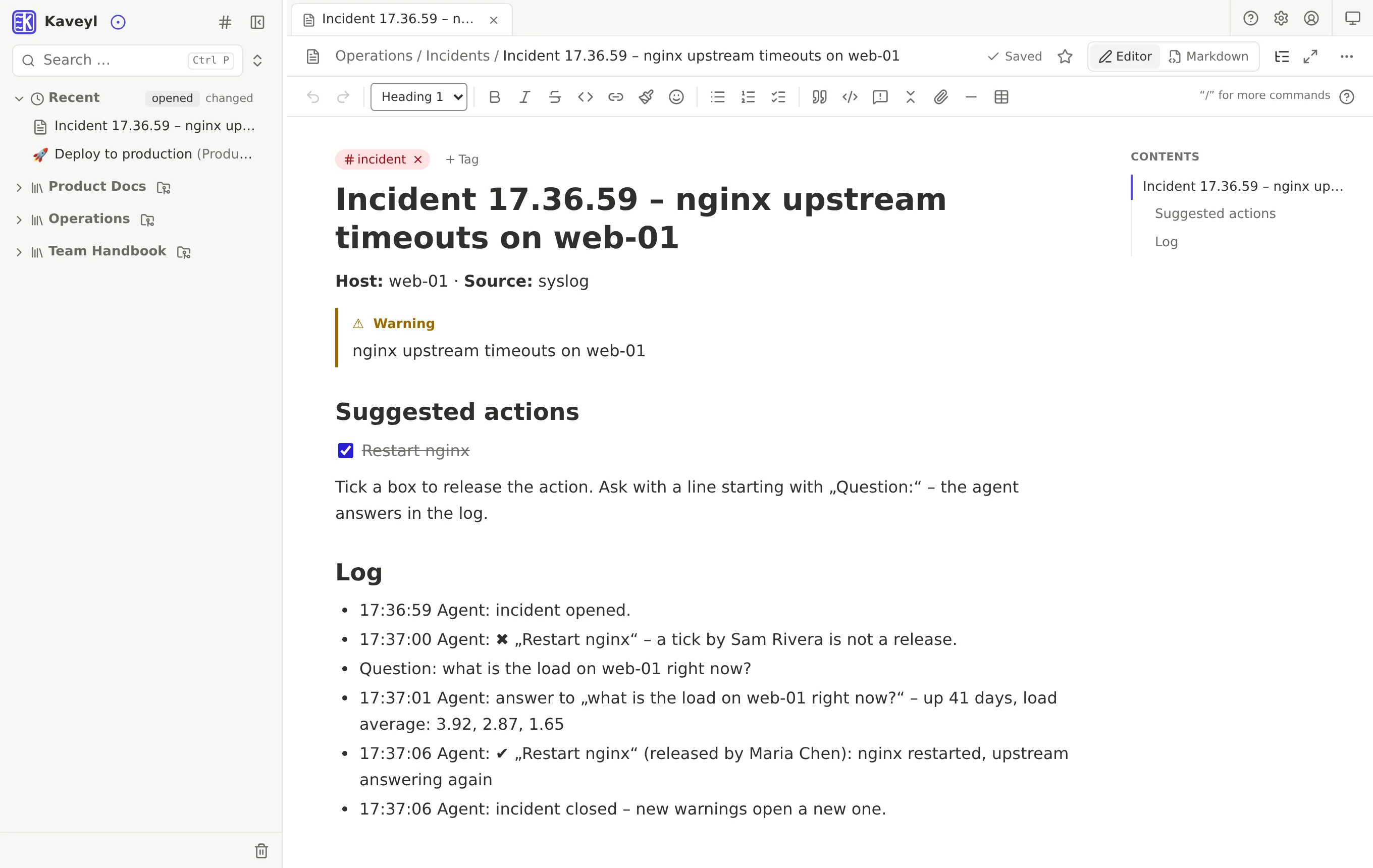
Only a change by a signed-in account can trigger anything, never text in a note. Tested with a real AI: Claude ignored hidden instructions in notes and logs. When asked to tick a box itself, it did – and the agent took the tick back, because an AI is not on its list.
Kaveyl Wiki provides the building blocks: MCP, event webhooks with the person behind every change, permissions and the Git history. Which agents you connect and what they may do is up to you – an example agent to start with is included. Meant for decisions a person should make, not as a replacement for monitoring.
No more copying and pasting into a chat window. Through the built-in MCP server your AI tools work with your wiki directly: they search, read and write notes. In a Git source every change becomes a commit with a name – review it, keep it or bring back the version before.
An agent sets up a server by following a guide from the wiki. Step 4 fails because a package was renamed. It finds the new name, finishes the setup and corrects the page through MCP. The commit carries the name of the person behind the token, the log marks it as MCP – and you see the exact difference in the version history.
Claude Code changes a service and its documentation in the same repository. Kaveyl Wiki picks up the push via webhook and shows the new page to the whole team within seconds – no copying, no second system.
Kaveyl Wiki itself was developed in exactly this loop: AI agents and a human working on the same Markdown, Git as the single source of truth.
The MCP server works with Claude Code, Cursor, VS Code, LM Studio and – through a small bridge – Claude Desktop. Scripts use the REST API, described at /api/v1/openapi.json.
Agents look up runbooks, specs and guidelines exactly when they need them – while coding or setting up a server.
YAML front matter is kept byte for byte, tables stay Markdown tables. Agents read the file exactly as it sits in the repository.
An agent – Claude, for example – gets an account of its own, like a colleague. It works on notes by itself, but sees only the sources, folders and notes you share with it, and every change it makes carries its name in Git.
Under Users & permissions, create an account of its own, such as “Claude Assistant”. The initial password can stay as you set it – nobody signs in with the account.
Give the account exactly the sources, folders or single notes it should read or change. With the default set to “see nothing”, everything else stays invisible to the agent.
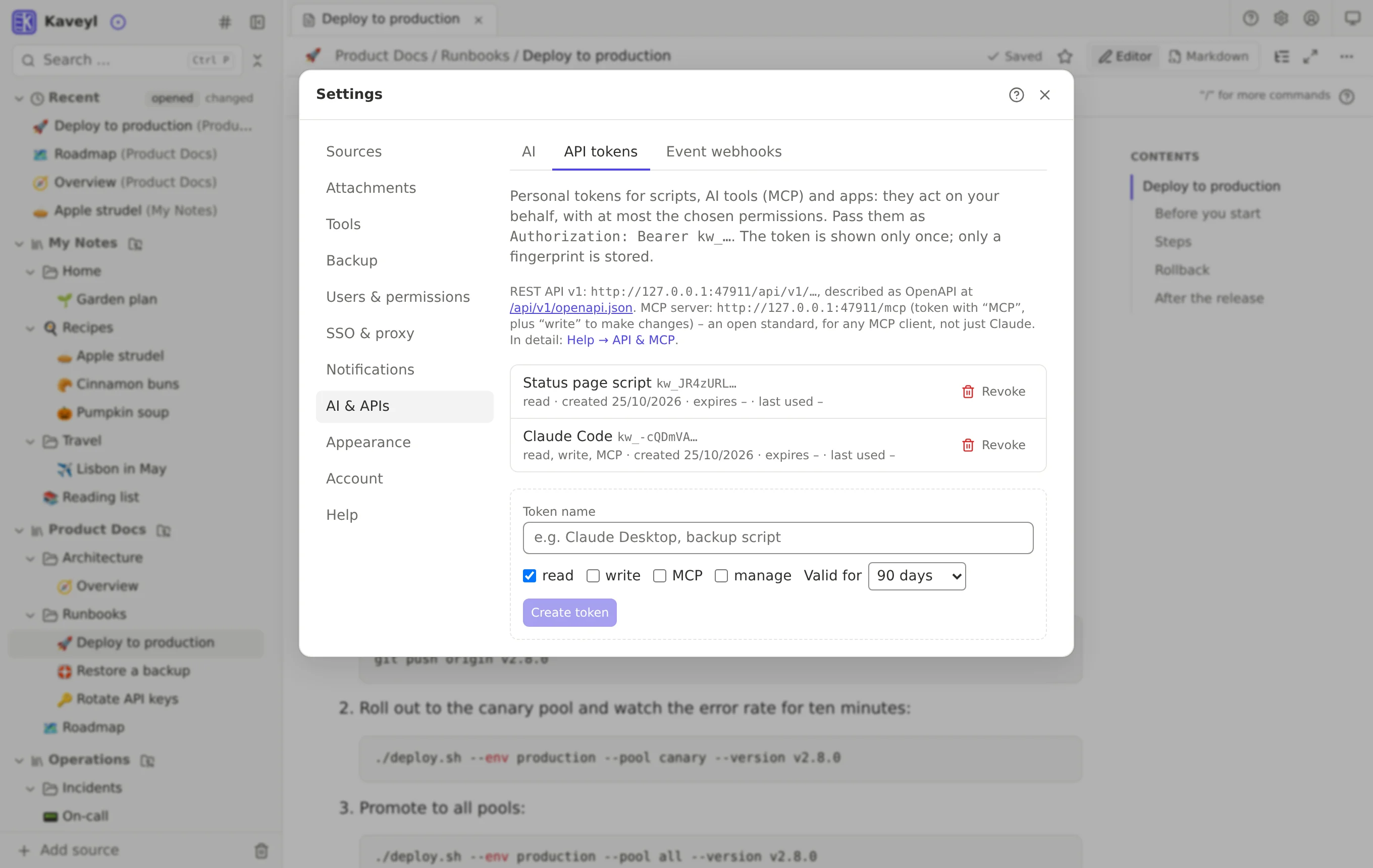
Under AI & APIs → All tokens you create a token for the account with read, write and MCP permission – without signing in as the agent. It can never do more than the account; renew or delete it at any time.
Kaveyl Wiki shows the ready-made command for Claude Code and the configuration for other MCP clients. From then on the agent creates pages, updates documentation and reworks drafts – only where its account may write.
Editor, search, permissions, encryption, backups, import from other apps, AI and much more – all on one page.
Kaveyl Wiki runs entirely on your side – as a single Docker container on a Linux server or NAS. No tracking, no forced cloud, no subscription.
docker-compose.yml – a single container.Your notes, the safety of Git and your AI tools in one fast workspace.
Kaveyl Wiki is in beta, in its final round of testing: the feature set is complete, bugs are still possible – so back up your data regularly and tell us what you find at me@kaveyl.app.

